What's new ·
Conversation Kanban
View conversations in stage columns (Queue, Open, Pending, and Closed) and drag them to take charge or close.
By Lucas Marchon, Founder at BrainChat
In the Conversations list, each agent sees one tab at a time. Team leads needed something different: a single view showing what is waiting, what is in progress, what depends on the customer, and what has already been resolved. The Kanban board shows exactly that.
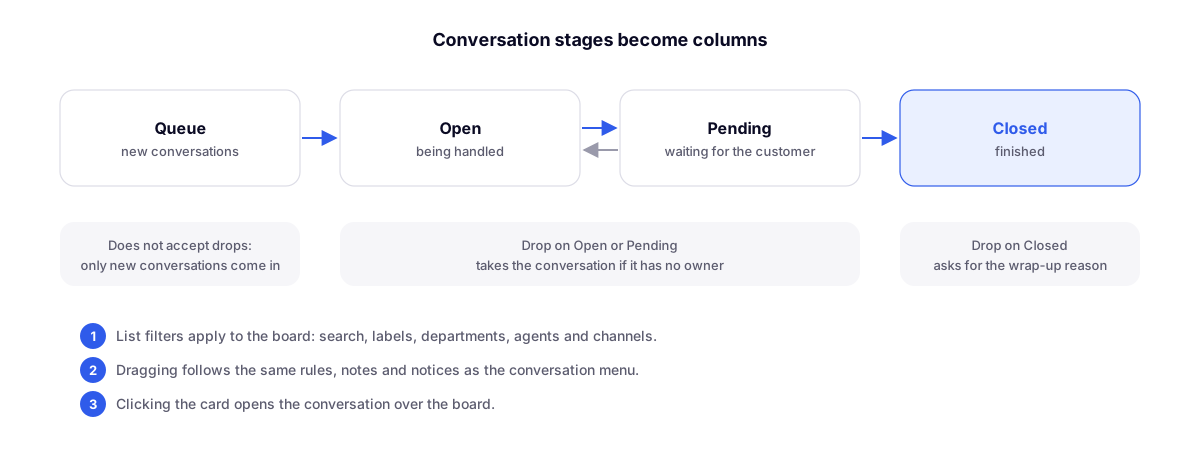
How it works
On a computer, the button next to Collapse list switches the list to the board. Your preference is saved for next time.
- Four columns, matching the list's stages: Queue, Open, Pending, and Closed.
- The same filters from the list apply to the board: search, tags, departments, agents, and channels.
- The card is the same as in the list, with the same right-click menu: transfer, tag, pin, mark as unread.
- Click on the card to open the conversation on top of the board. The contact profile only appears if you open it.
What happens when you drag
| Drag to | What BrainChat does |
|---|---|
| Open or Pending | Takes charge of the conversation if it has no assigned agent yet |
| Closed | Requests the closing disposition before closing |
| Queue | Not possible: the Queue only receives new conversations |
Dragging follows the same rules, notes, and warnings as the menu and the conversation header. There is no second set of status rules just for the board.
Who it is for
- Supervision: spot bottlenecks at a glance, such as too many Pending conversations or a growing Queue.
- Small teams: distribute work by dragging, without opening conversations one by one.
- End of the day: batch-close what has already been resolved, each with its own disposition.
Complements
- Custom closing disposition: the list of reasons that appears when dropping the card into Closed.
- Unified inbox and cross-channel transfer: with the channel filter, the board shows conversations from multiple numbers together.
- New conversations inbox with status and departments: where the stages that became columns originated.