What's new ·
Unified inbox and cross-channel transfer
Agents handling multiple numbers see all conversations in a single list and can check history or transfer the customer to another channel in the organization.
By Lucas Marchon, Founder at BrainChat
Many companies have one number for sales, another for support, and a third for finance. Anyone managing more than one had to constantly switch channels in the header, and customers who messaged the wrong number had to start the conversation all over again. Both of these things have changed.
Unified inbox
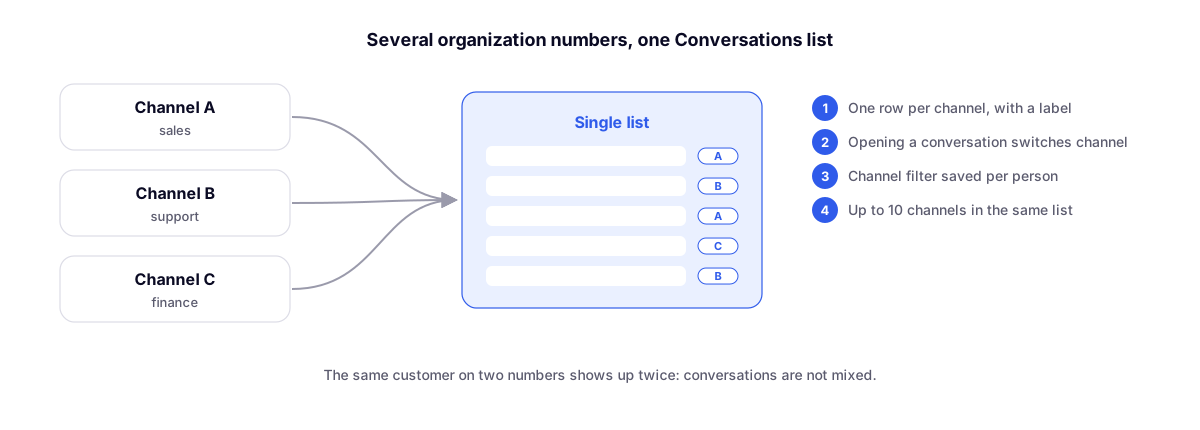
Agents handling multiple channels within the same organization see contacts from all of them in the same Conversations list:
- One row per channel, with the number's label. The same customer on two numbers appears twice, without mixing the conversations.
- Channel filter saved per person and per organization in the browser. Each agent chooses what they want to see.
- Opening a conversation switches the selected channel to match it. Messaging, sending, the header, and the profile automatically follow the correct channel.
- Up to 10 channels in the same list. With just one channel, nothing changes.
History and cross-channel transfer
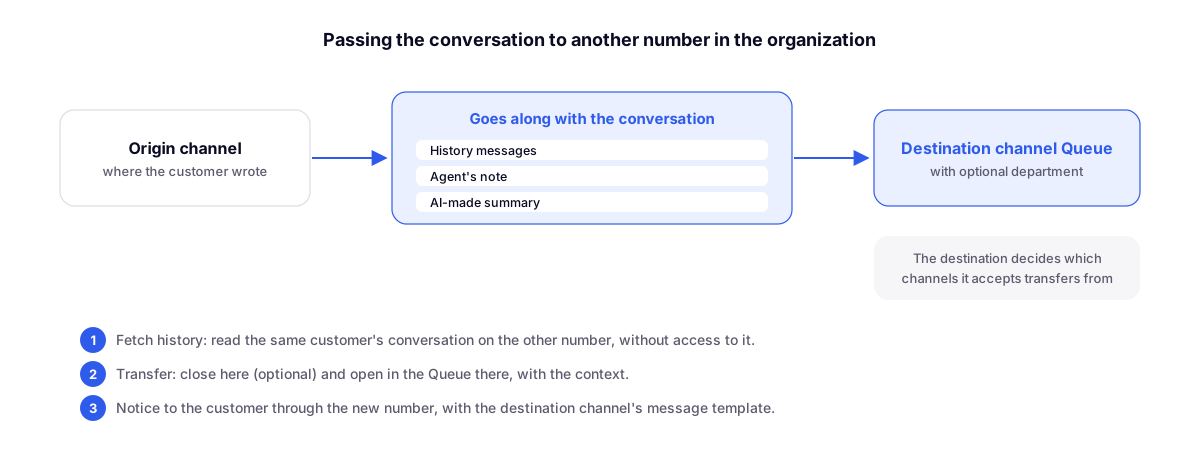
When a customer talks to the wrong number, the agent has two options:
- View history: read the customer's entire conversation on the other channel in read-only mode, without needing access to that number.
- Transfer: send the support request to the Queue of the other channel, with an optional department. The current conversation can be closed in the same step.
The context goes along with it as a card in the destination conversation: the messages reviewed from the history, the agent's note, and an AI-generated summary. The customer can receive a notification through the new number using a message template chosen by the destination channel. On the official API, the template must be approved by Meta.
Who decides
In the Access tab of the chat settings, each channel defines which other channels it accepts history queries and transfers from. The person needs cross-channel support permission on the source channel: View enables history queries and Create enables transfers.
Complements
- Organization with multiple numbers in one place: the foundation that brings the company's channels together.
- Conversation Kanban: with the channel filter, the board also displays multiple numbers together.
- One number on the official API and WhatsApp Web at the same time: coexistence within the same channel.