What's new ·
AI Credits: assistants, Wiki, and Flow without needing a key
Since October 31, BrainChat's AI features use credits included in the plan. The Gemini key remains only for AI agent conversations, with migration to credits planned for the second half of 2027.
By Lucas Marchon, Founder at BrainChat
Since October 31, the AI in BrainChat's features comes ready to use. You no longer need to create or register an AI key to use assistants, Wiki, or Flow: the AI is provided by BrainChat and usage is counted in AI credits, which are included in your plan.
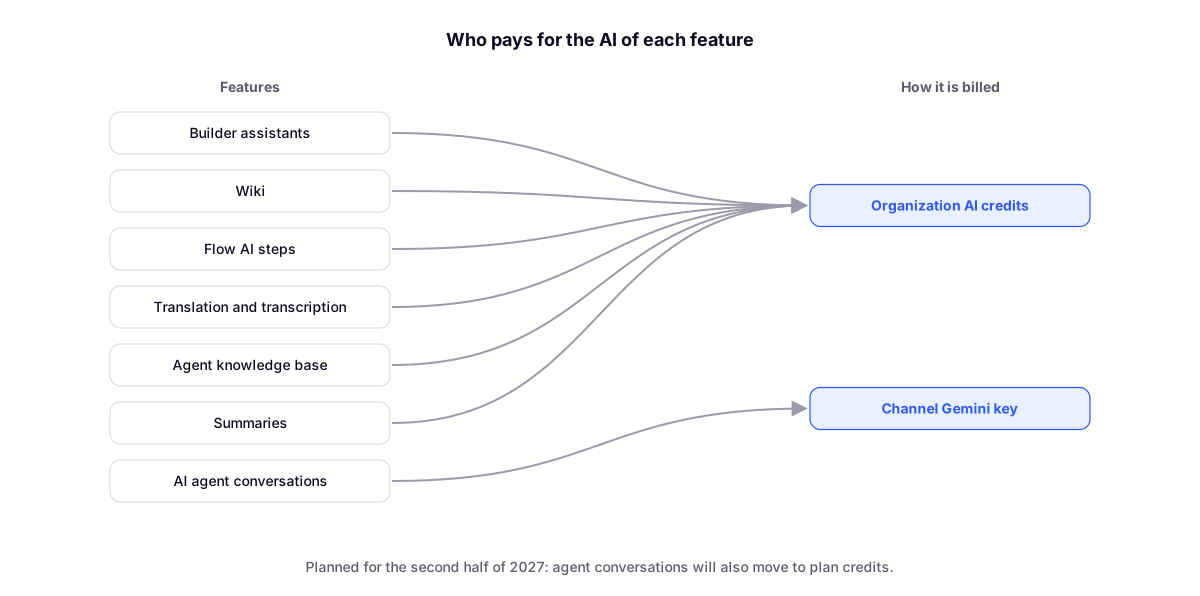
What now uses credits
- Builder assistants: for the agent, Flow, tables, Studio, landing page, HTTP request, and synchronization.
- Wiki, including advanced mode.
- Flow: AI steps and web data scraping.
- Translation of conversations and forms.
- Transcription of audio and calls.
- Agent knowledge base: document reading and website importing.
- Summaries for contacts and channel transfers.
What continues using the Gemini key
AI agent conversations (WhatsApp, Live Chat, and voice) continue using the Gemini key registered in the channel, just like today. Agent Pro remains free of charge until 12/31/2026.
Planning for the second half of 2027: agent conversations will also start using plan credits, and the Gemini key will no longer be necessary. With all AI provided by BrainChat, we can ensure greater stability and consistent delivery quality across all features, without depending on each account's configuration. We will notify you in advance before any changes are made.
What each plan includes
Every plan comes with a monthly allowance to try things out. It renews at the beginning of each month and does not roll over.
| Plan | Credits per month |
|---|---|
| Basic and Pipefy | 20 |
| Intermediate | 50 |
| Advanced | 150 |
| Enterprise | 400 |
Need more? Each pack gives you 100 credits for R$ 10. Purchased credits do not expire and are used after your monthly allowance runs out.
Where to buy and track usage
Everything is located under Billing → Usage analysis → AI credits:
- Buying credits: if you pay for your subscription by credit card, you buy them with your card; if you pay by bank slip (boleto), the amount is added to your next boleto, and the credits are released immediately.
- Auto-recharge: automatically purchases packs when your balance drops below the minimum, up to the monthly limit you set.
- Consumption: your balance, allowance usage, credits per day, per feature, and a statement showing the agent, Flow, or table where each credit was used.
Only organization billing managers can make purchases. Assistants, Wiki, and the Flow AI step show a badge with your balance, which turns yellow when it's low and red when it runs out.
When credits run out
Features that use credits will pause and display a warning with a Buy credits button. Channel transfers never get stuck: they just proceed without the summary. Agent conversations are not affected because they use the Gemini key.
Related
- How AI credits work in BrainChat: the complete guide covering purchases, auto-recharge, and tracking.
- Team with permissions by area: whoever manages billing is the one who buys credits.