What's new ·
BrainChat connector for AI apps (beta)
Use BrainChat from inside Claude, ChatGPT, Codex, Cursor, VS Code, and Antigravity, with your own login and permissions. In beta, at no extra cost.
By Lucas Marchon, Founder at BrainChat
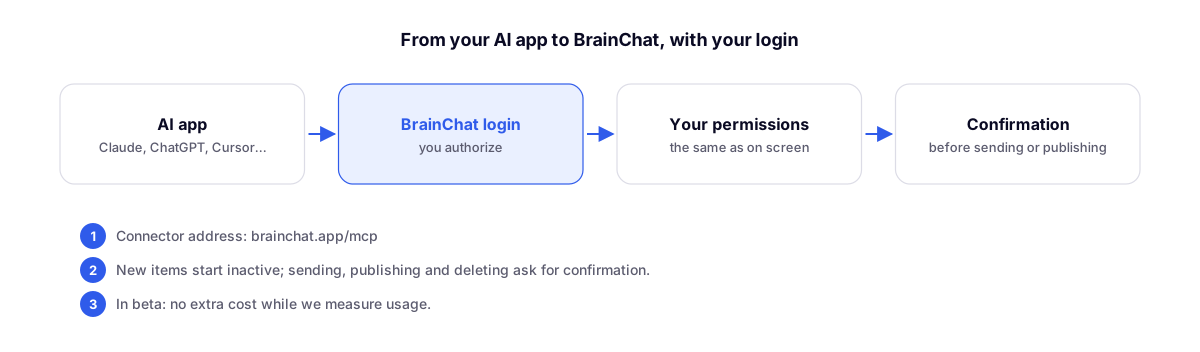
You can now use BrainChat from inside your AI app. With the connector (an MCP server), you can make requests in natural language, such as "which conversations have been unanswered for more than 2 hours?" or "create a landing page for the November campaign," and the AI app will query and work in BrainChat for you.
In beta, at no extra cost
The connector is in beta. During the beta, using the connector incurs no extra cost: it comes included with your BrainChat account. We are measuring usage to understand how it will be part of our plans.
- Until December 1, 2026, the beta terms of use (such as limits and available features) may change.
- Any future billing will be notified at least 30 days in advance, as set forth in the Terms of Use.
- The only thing that already uses AI credits is conversation analysis performed by the server, when enabled by the organization, and it requests confirmation of the estimated cost before running.
Where it works
The connector address is https://brainchat.app/mcp. The documentation provides a step-by-step guide for each app:
| App | Where |
|---|---|
| Claude | claude.ai, Desktop, mobile, and Claude Code |
| ChatGPT and Codex | ChatGPT (developer mode) and Codex |
| Cursor and VS Code | Cursor, VS Code, and other editors with MCP |
| Antigravity, in the IDE and command line |
You see and do only what you already can in BrainChat
The connector logs in with your account, and the same screen rules apply: organizations, channels, and areas cleared for you, exclusive support, portfolios and departments, item sharing, and plan limits. If your account is deactivated, the connector stops as well.
Nothing goes live without you
- New items (agent, Live Chat, Link in Bio, landing page) are created as inactive.
- Sending messages, publishing, activating, and deleting require confirmation: the AI app shows what it is going to do and only executes after you confirm.
- The connector never shows keys, passwords, plans, prices, or how a channel is connected.
- Each person has a limit of 60 queries per minute and 1,500 per hour across all connections.
What you can do
- Support: search contacts, read conversations, summarize a period, and send messages, approved templates, or quick replies.
- Data: read and edit table records, build Studios with charts, and query metrics, always compared to the previous period.
- Building: AI agents, Flows, forms, Link in Bio, Live Chat, landing pages, and email templates, following the design guide and native BrainChat blocks.
- Sending: scheduled WhatsApp messages and email campaigns, with testing and confirmation of the recipient count.
The complete list by area is available at What the connector does.
Complements
- AI credits: what uses credits inside BrainChat.
- Two-step login verification: connector authorization follows the same login, including the code when active.