What's new ·
Landing Pages 2.0: themes, ready-made blocks, and design review
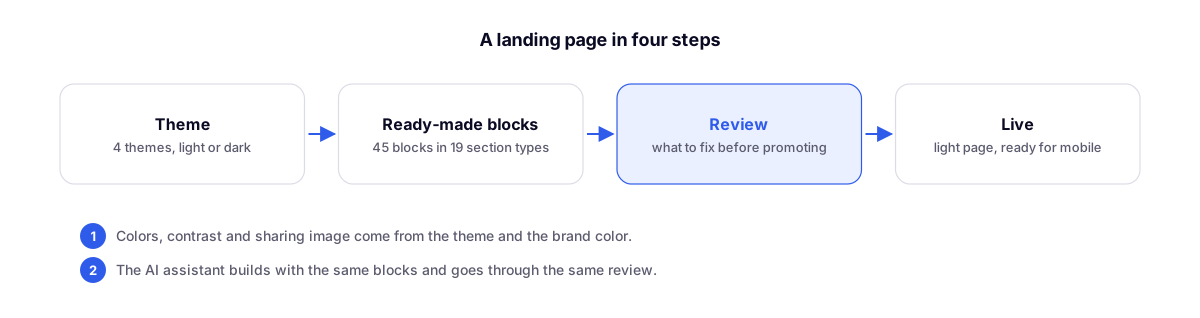
A single editor, four themes, 45 ready-made blocks, review before publishing, and lighter, faster mobile pages. Existing pages have been converted to the new format.
By Lucas Marchon, Founder at BrainChat
The landing page builder has been rebuilt from the engine to the editor. The idea is simple: you choose a theme, build with ready-made blocks, and your page comes out looking great, readable, and fast, without having to tweak fonts, colors, and spacing section by section.
Four themes, light or dark
Start with the theme: Precision, Editorial, Neo-brutal, or Dopamine, each in light or dark mode. In the Appearance tab, you define the theme, mode, brand color, and motion (no motion, subtle, or expressive), and you can compare themes on your own page before choosing.
Text contrast is calculated from the brand color so the page remains readable in any combination.
19 section types and 45 ready-made blocks
Hero, column features, mosaic, tabbed features, numbers, brand banner, steps, testimonials, comparison, FAQs, form, image and text, text, gallery, video, pricing, custom HTML, call to action, and footer, plus the header.
- Ready-made blocks that follow the page theme, organized into hero, features, proof, how it works, contact, footer, and custom HTML.
- Icons by name and ready-made code visuals: WhatsApp conversation, AI agent, dashboard with numbers and chart, step-by-step board, and calendar.
- Photos in feature cards and the mosaic, full or cropped.
- Gallery in grid or mosaic, YouTube or Vimeo video, and pricing in cards or rows with a highlighted plan.
- BrainChat form inside the page, including within the custom HTML block.
Templates to get started
Nine ready-made templates already linked to the chosen channel's WhatsApp: travel agency, strategic consulting, product e-commerce, B2B distributor, industry and manufacturing, insurance brokerage, collection agency, SaaS and software, and event or course. Or start from scratch.
Review before publishing
The new Review tab checks the page and separates what to fix before publishing from what is just for improvement. The preview shows the page on desktop, tablet, and mobile.
AI assistant in the editor
The assistant builds and adjusts the page using the same blocks as manual editing and goes through the exact same review. For example, ask it to "build the entire page for my business." It uses the organization's AI credits and does not generate images.
Lighter and faster page
- The page is delivered ready-made with lightweight code and loads quickly, even on mobile.
- Fonts come from BrainChat itself, and third-party tracking scripts only load after the visitor gives marketing consent.
- The sharing image (the one that appears when sending the link on WhatsApp or social media) is designed based on the theme. If you upload your own image, that one will be used.
- The WhatsApp button can lead to a single number or a list of agents.
What about my existing pages?
They were converted to the new format one by one, with a backup copy of the previous version. You don't need to do anything. If you find any page with a notice that it needs to be updated, please contact support.
Related
- Landing Page Editor Guide: step-by-step documentation.
- BrainChat Connector for AI Apps (Beta): create and adjust landing pages directly from within your AI app, with the same design review.