What's new ·
Broadcasts: sends, templates, metrics, and logs all on one page
WhatsApp and email in the same place, table-based scheduling with row-by-row personalization, completion estimation, cancel and resume, and the result for each recipient.
By Lucas Marchon, Founder at BrainChat
Scheduled messages are now Broadcasts: a single page for all high-volume outgoing WhatsApp and email messages. It is located in the Conversations menu, under Broadcasts, with Sends, Templates, Metrics, and Logs tabs. Users of both channels can switch between WhatsApp and Email at the top.
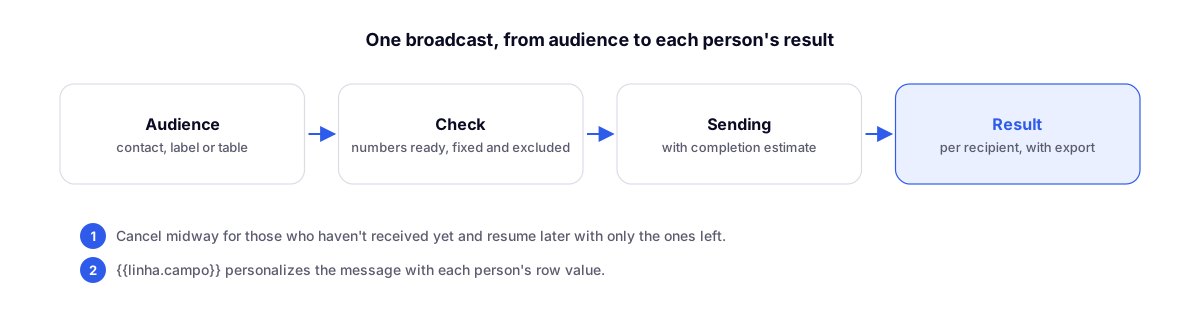
Audience by contact, label, or table
- Choose recipients By Contact, By Label, or By Table. For tables, you use the entire table or a saved view and specify the phone column.
- Numbers are checked before entering the list: ready, corrected, duplicates, and those left out.
- Under Recipient source, the page shows a complete audit trail, from table records to the final list, and why each person was excluded: invalid number, duplicate (with or without the 9), above the broadcast limit, or already on the list from another source.
- You can schedule using only an approved template.
Message personalized by table row
Use {{linha.campo}} in the text or in a template variable: each person receives the value from their own row, such as the product name, order date, or responsible salesperson.
How long it will take
Before confirming, BrainChat shows the estimated time and expected completion time, calculated based on the actual pace of that channel. If the send goes beyond the allowed time, it warns you. On the official WhatsApp API, there is a fast pace of 2 to 5 seconds between messages.
Cancel midway and resume
Cancel send now works while a broadcast is in progress: anyone who hasn't received it yet is marked as stopped. Afterward, Resume send continues with only those people.
Result for each recipient
- Filters for sent, delivered, read, replied, didn't reply, clicked the button, automated response, failed, stopped, and queued, with search by name or phone.
- Summary of clicked buttons.
- Export to a spreadsheet that opens directly in Excel.
- "Replied" counts responses within up to 72 hours.
The Metrics tab compares sent, delivered, read, replied, and failed messages with the previous period and shows the results by campaign.
The Queue remains for those who need support
- Scheduled templates do not open a support ticket.
- Broadcasting to a new contact leaves the conversation in Closed, with no assignee, instead of clogging the Queue. When the customer replies, the conversation opens normally.
- Automated customer responses (such as away messages) are flagged as such, do not enter the Queue, and do not count as a reply.
Complementary
- Broadcasts in the documentation: step-by-step instructions in the documentation.
- Email templates with themes, branding, and review: the email side of Broadcasts.
- BrainChat connector for AI apps (beta): also schedule WhatsApp broadcasts and email campaigns through your AI app, always with confirmation.