What's new ·
AI agent responding to email and more than one domain per organization
The same WhatsApp AI agent now responds to emails from the chosen sender and stops when the team takes over. Organizations can also have more than one email domain.
By Lucas Marchon, Founder at BrainChat
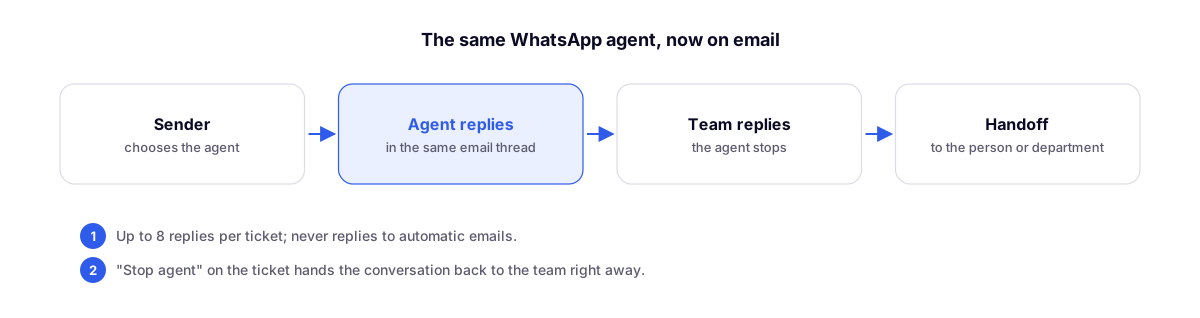
The AI agent that handles WhatsApp now responds to emails as well.
How to enable
Under Domain & Privacy → Email, open the sender and choose the AI agent to respond (the default is "None, only the team responds"). From then on, incoming emails through that sender are answered by the agent in the same customer email thread, using the company's signature and banner.
The agent knows when to stop
- Stops as soon as a team member replies.
- Responds up to 8 times per ticket and only on open tickets.
- Never replies to automated emails.
- Actions to transfer, pause, and close become a handover to the team: the ticket goes to the person or department specified in the action. Actions that only exist on WhatsApp, such as tags and follow-ups, do not run on email.
- Inside the ticket, the notice "The AI agent is responding" includes a Stop agent button, and its messages are marked as AI Agent.
The agent uses the same AI key it already uses on WhatsApp.
Organization agent
AI agents now belong to the organization, just like Studios and Flows: anyone with Agent permissions or who leads the organization can access the agents from any of its channels.
More than one email domain
Under Domain & Privacy → Email, clicking Add another domain registers more than one domain in the same organization, including the company's main domain. Senders, DNS, and signatures follow the chosen domain. Before enabling reception on a domain that already receives emails on another service, a warning screen informs you that emails will now arrive in BrainChat.