What's new ·
Chat actions: buttons in the conversation that run a Flow for the contact
The agent runs an action right inside the conversation (update profile, add to pipeline, send proposal) and the Flow does the rest. The Flow also got the Update contact, Update company, and Contact labels steps.
By Lucas Marchon, Founder at BrainChat
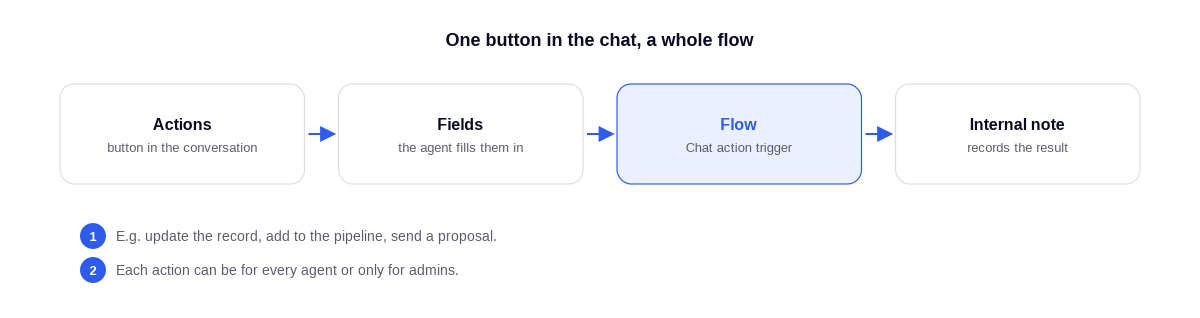
Tasks that agents repeat all day, such as updating a profile, adding the customer to the pipeline, or sending a proposal, are now buttons inside the conversation. They click, fill out whatever is needed, and a Flow does the rest.
How to set it up
- Create a Flow with the Chat action trigger. It receives the conversation contact, their company, the channel, who clicked, and the fields requested by the action. WhatsApp steps already send to this contact.
- Publish and turn on the Flow.
- Under Chat settings → Apps → Actions, click New action and choose the Button name, the Flow, and Who can use it: Everyone who handles the channel or Admins only.
To get started quickly, the Flow gallery has ready-made templates in the Chat actions group: Add to pipeline, Update profile, Send proposal, and Notify another team.
How the agent uses it
In the conversation, the Actions button lists the channel's actions. When choosing one, the agent fills out the fields (if the action requires them) and confirms. They see the result right away, and each use is logged as an internal note in the conversation detailing what happened.
New steps in Flow
- Update contact: finds the person by the trigger contact, phone number, email, or id, and updates name, email, job title, notes, company, and custom fields, across all organization channels or just one. The phone number cannot be changed via this step.
- Update company: finds the company by the contact's company, CNPJ or CPF, domain, or name, and updates the record. If not found, you choose whether to stop, continue, or create the company.
- Contact labels: adds or removes labels without altering the support ticket. Combined with Find record and Looping, it labels an entire list of contacts.
The steps record only what changed. The action itself does not use credits; AI steps inside the workflow do, just like in any Flow.
Read more
- Flow: ready-made journeys, review before publishing, and run now: the Flow template gallery.