What's new ·
Email templates with themes, organization branding, and review
New email template editor: branding filled in once, four themes with dark mode, 50 ready-to-use pieces, AI assistant, pre-send review, and block-level click tracking in campaigns.
By Lucas Marchon, Founder at BrainChat
The email template editor has been redesigned so your emails match your brand without having to build everything from scratch. You can find it at Disparos → E-mail → Templates.
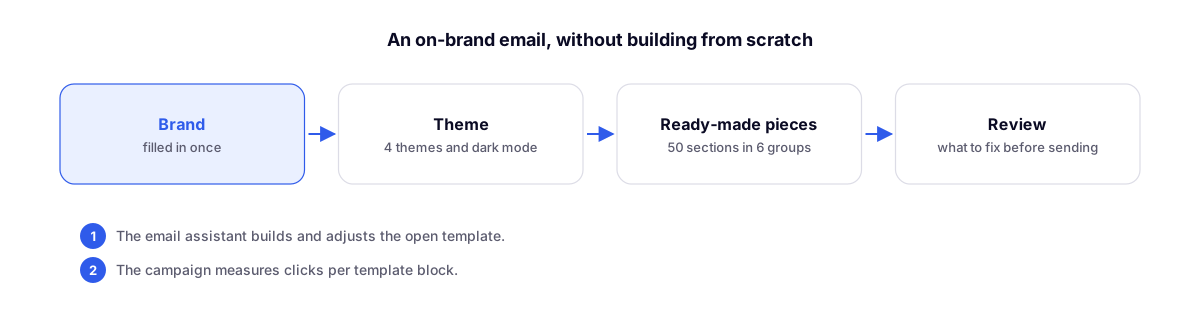
Organization branding, filled in once
In the Appearance tab, the Organization branding section stores your logo (along with a logo for dark backgrounds), name, brand color, website, footer address, legal line, and social media links. It applies to all templates. Only the organization owner or an administrator can change the branding.
Four themes, with dark mode
The same themes as the landing pages: Precisão, Editorial, Neo-brutal, and Dopamina. The Appearance tab displays your email in each theme side by side. It includes an automatic dark palette, dark mode preview, accent color, and width settings.
50 ready-to-use pieces
Add Section opens the gallery featuring 50 pieces across six groups: header, content, highlights, call to action, footer, and advanced. Each piece automatically adopts the email's theme and branding. The blocks you save appear under Saved blocks, and you can switch the same content's format with a single click.
The List block comes in three styles: with icons, checkmarks, or numbered. The icons adapt to the theme and brand color, including in dark mode.
To get started, there are 23 ready-to-use templates, such as welcome, birthday, launch, time-sensitive offer, product showcase, and event invitation, as well as the Blank template.
Email assistant
The Email assistant builds and adjusts the open template. Each change made by the assistant can be undone in a single step. It uses the organization's AI credits.
Review before sending
The Review tab separates things to fix before sending from items that are just suggestions for improvement, such as an email that is too large for certain email clients. Click on an item to jump straight to it. The review never prevents you from saving.
Campaigns track clicks per block
When setting up a campaign, choose between Template or HTML Text. The campaign sends the template as it stands at the moment of sending and alerts you if there are still items in the Review. With Track links to measure clicks per block, the sent campaign displays Where they clicked.
What about old templates?
They will continue to work and open in the previous editor, which features a Convert to new format button. The conversion only takes effect after you save. New templates are created in the new format by default.
Related
- Email templates in the documentation: step-by-step guide in the documentation.
- Disparos: sends, templates, metrics, and logs on a single page: where templates and campaigns are located.
- Landing Pages 2.0: the same themes on pages.