What's new ·
Email: personal inbox, SLAs, merging tickets, and supervisor metrics
Private personal inbox with more than one owner, ticket number in the subject line, response and resolution SLAs, merging and splitting tickets, custom tabulations, and email metrics in the supervisor.
By Lucas Marchon, Founder at BrainChat
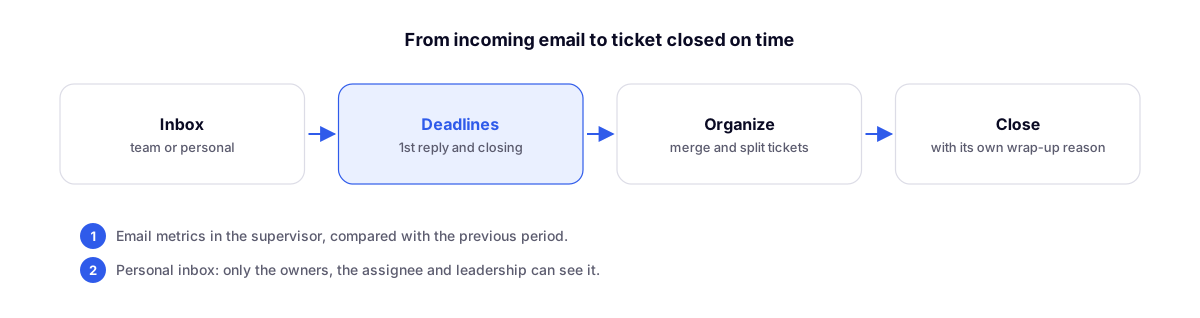
The other part of this email release organizes tickets and measures support, just like WhatsApp already does.
Team or personal inbox
Each sender can be set as Organization (shared team inbox) or Personal. A personal inbox can have more than one owner, such as a finance@ address handled by two people, and its emails only appear for the owners, the assigned agent, and leadership. With multiple owners, choose between the owners' queue and distribute among owners.
Ticket number in the subject line
In the Sending tab, Include ticket number in the subject line (enabled by default) adds the number to emails started by the team, such as "Commercial proposal [#123456]". Each sender can follow the default, always include it, or never include it.
SLAs
In the SLAs tab, enable the 1st response SLA and resolution SLA in hours. The list flags items that have missed their deadline, and the automated response does not count as the first response.
Merging and splitting tickets
- Did a client open the same topic across multiple emails? Select the tickets in the list and use Merge (up to 20 at a time), choosing which one stays active.
- Did a client mix two topics into a single email? From the message menu, select Split into new ticket.
Email tabulation
In the Closure tab, enable Require tabulation upon closure and set up email reasons, separate from WhatsApp ones, with outcomes, mandatory notes, and departments. This applies when closing a single ticket or multiple tickets at once.
Quick templates with variables
Quick templates now have variable buttons, such as client's first name, full name and email, subject, ticket number, your name, and your title. If any field is left without a value, BrainChat warns you before sending.
Email metrics in the supervisor
In Metrics, the WhatsApp | Email selector now displays email data (in queue, open, pending, waiting for 1st response, and overdue) and period data compared to the previous period: received and resolved tickets, time to 1st response and to resolution, on-time percentage, breakdown by person and by department, and how tickets were closed. Each person only sees the tickets they have permission to view.
Related
- Email: signature with banner, auto-reply, and AI-suggested responses: the first part of this release.
- Support SLAs in WhatsApp Conversations: the same SLA controls for WhatsApp.