What's new ·
Team: everyone in the organization, with a channel only if needed
Invites and members now have their own pages, permissions are split between organization areas and WhatsApp in channels, and you can invite someone just to the organization without a channel.
By Lucas Marchon, Founder at BrainChat
Not everyone on the team handles WhatsApp. Those who manage Tables, Studios, Flow, or email can now join the organization without needing a channel.
Invite on its own page
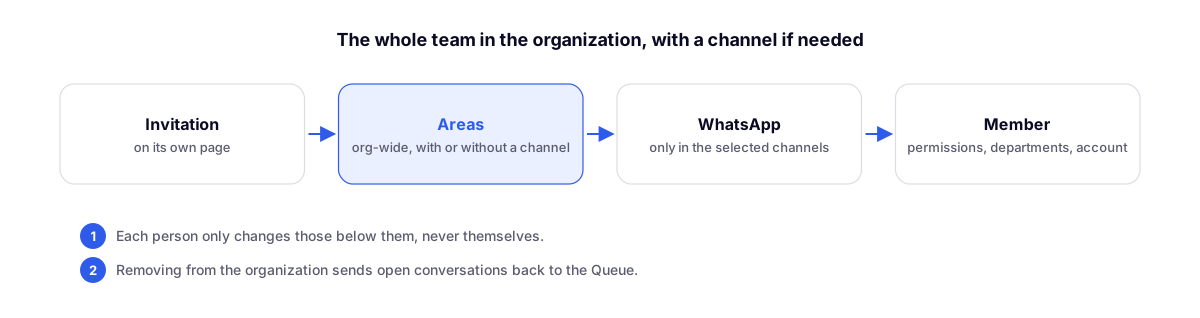
In Team → Invite Member, the Invite member page has three parts:
- Person: email and name;
- Organization areas: email, Tables, Forms, Studio, Flow, Wiki, Agents, Landing, Link in Bio, Calendar, API, Webhooks, and administration. These apply with or without a channel;
- WhatsApp in channels: conversations, calls, contacts, scheduled messages, and templates, only in the selected channels. This is optional.
Only the organization owner and administrators can invite someone without a channel. In the list, this person appears with Organization only in the Channels column.
Member on its own page
Each member has a page with the Permissions, Departments, and Account and status tabs: resend invite, reset password, organization role, deactivate, remove from your channels, and remove from the organization.
Single-level rule
- Each person can only modify, deactivate, or remove those below them, and never themselves.
- Remove from the organization removes the person from channels, departments, and portfolios, and their open conversations return to the Queue.
Settings
- The My Account menu has been renamed to My Organization.
- In chat settings, the Email section now has a Departments tab, and the tabs follow the same order as WhatsApp.
- Changing the organization timezone no longer deletes a channel's individual timezone, such as a Mexico channel in a Brazil organization.
Related
- Team with permissions by area: the permissions by area that now also apply without a channel.