What's new ·
System status and instability notice
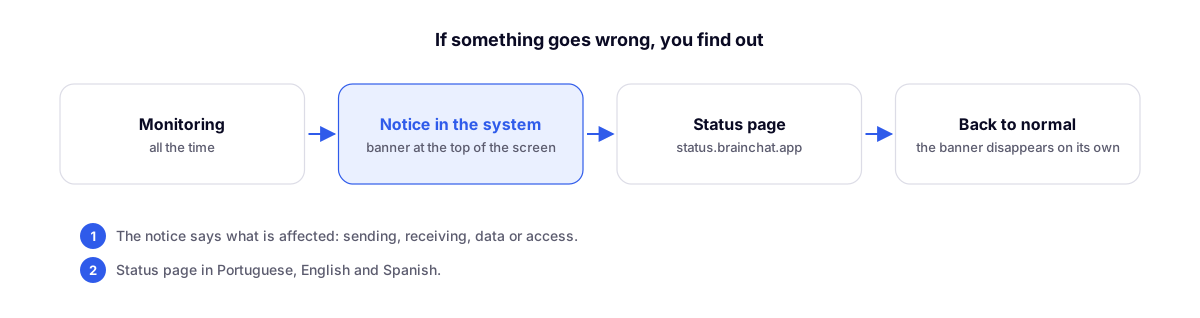
Public status page at status.brainchat.app, in Portuguese, English, and Spanish, plus a top banner in the system whenever any part experiences instability. Applies to all customers, no configuration required.
By Lucas Marchon, Founder at BrainChat
When any part of BrainChat becomes unstable, you don't need to guess whether the issue is with your account: the system itself alerts you, and the status page shows the status of each part. This applies to all customers and requires no configuration.
Status page
At status.brainchat.app, available in Portuguese, English, and Spanish, you can see the status of each part of BrainChat:
- Website
- System access
- Message sending
- Receiving, via WhatsApp API and WhatsApp Business
- AI Agent
- Scheduled messages and Automations (Flow)
- Data loading
- Tables and integrations
Automations were added to the page on 11/18. They flag an issue when something stops moving, such as a scheduled dispatch that passed its deadline without going out, a Flow that didn't start, or an agent that stopped responding during business hours. A delay configured by you or a disconnected channel do not count as instability.
The page updates automatically every few minutes, without requiring any manual action.
Notice inside the system
During an instability event, a banner appears at the top of the screen stating what is affected. For example:
> We are experiencing instability in message sending… Track
The Track link opens the status page. When everything returns to normal, the banner disappears automatically. If you prefer, you can close it beforehand; it will only reappear if a new notice comes up.
Menu shortcut
In the Developers menu, the System status shortcut opens the status page in the language you use in BrainChat.
Complements
- Trust Center: BrainChat's security, privacy, and sub-processors.