What's new ·
Share button across all assets and clearer permissions
Agents, Studios, Flows, tables, forms, and pages now share the same Share button, and each person only sees what has been granted to them.
By Lucas Marchon, Founder at BrainChat
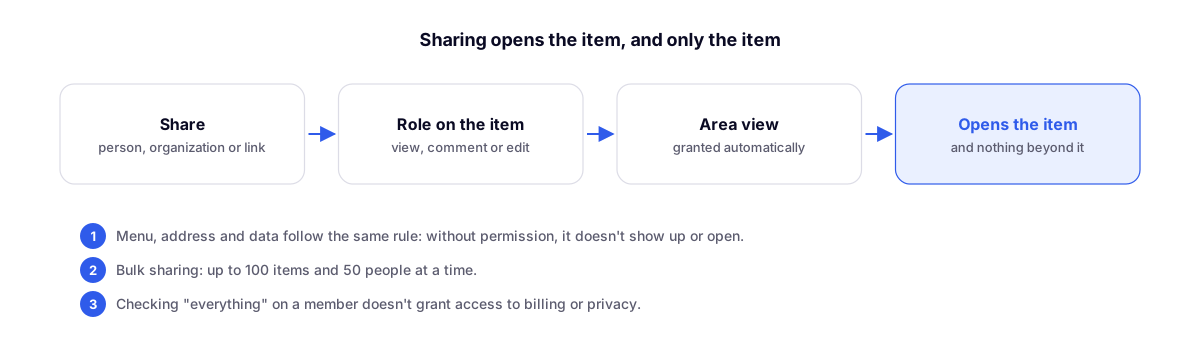
Sharing a Studio or a table with a teammate used to require giving them access to the entire workspace. Now sharing works like a drive: the person opens the item, and only the item.
The same button everywhere
Agents, Studios, Flows, tables, forms, Live Chat, link in bio, and landing pages have the same Share button, right next to Save. It opens a small window, anchored to the button:
- Add people, with each person's role.
- Who already has access.
- General access: invited only, the entire organization, or a public link, when the item allows it.
Consistent permissions
Menu, URL, and data all follow the same rule. Anyone without permission won't see the item in the menu, won't open it via the link, and won't receive the data.
- Tables is now a dedicated team permission.
- Checking "all" for a member does not grant access to billing or privacy.
Bulk sharing
From the lists, select multiple items and share them with multiple people at once: up to 100 items and 50 people. Each person receives a single email with everything that was shared.
Related
- Team with workspace-level permissions: the foundation of permissions.
- Organization with multiple numbers in one place: items that belong to the organization, not to a single number.