What's new ·
Table formulas: MAXBY, MINBY, and SUMUNIQUE
Bring in a field from the most recent or oldest record of a linked table, and sum values without duplicates. Calculated fields are now all formula fields, and recalculation is faster.
By Lucas Marchon, Founder at BrainChat
Table formulas now include functions to summarize linked tables, and all calculated fields now use the same authoring method: the formula field.
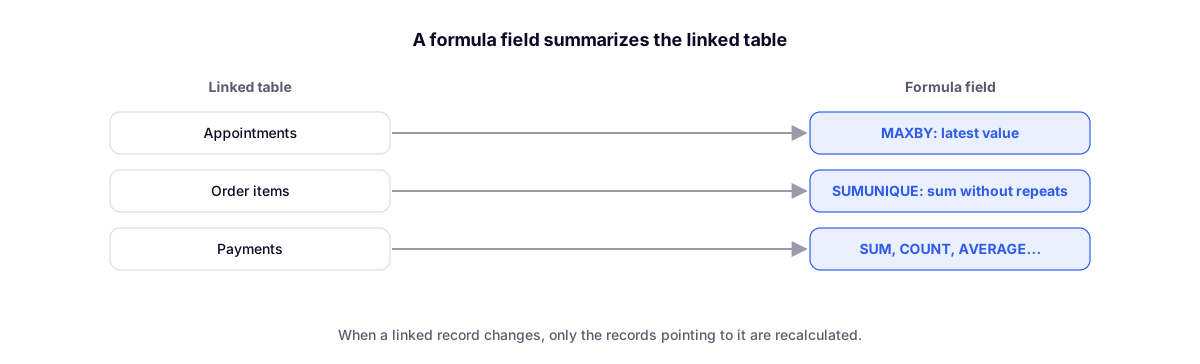
MAXBY and MINBY: a field from the most recent record
Brings in a field from the record with the highest (or lowest) value of another field. For example, the branch of each customer's most recent appointment:
`` [Appointments].MAXBY([Date], [Branch]) ``
With a condition in the third argument, such as only completed appointments:
`` [Appointments].MAXBY([Date], [Branch], [Status] = "Completed") ``
MINBY does the same with the lowest value (the first appointment, for example). In case of a tie, the record created first wins.
SUMUNIQUE: sum without repeating
Sums a value once per key. Useful when the value repeats across multiple records, such as the order total in each item:
`` [Items].SUMUNIQUE([Order], [Order total]) ``
Records without a key are excluded, and with no records the result is 0.
After the dot, the available functions are: SUM, SUMUNIQUE, COUNT, AVERAGE, MAX, MIN, FIRST, LIST, UNIQUE, MAXBY, and MINBY.
Faster recalculation
When a linked table record changes, only the records pointing to it are recalculated, not the entire table. Values update faster, even in large tables.
A single way to calculate
A calculated field is always a formula field, under Behavior → How the field is filled → Formula. The old calculated column types have been removed from the editor, and existing fields have been converted with the same values. You don't need to do anything: right after conversion, the field may appear blank while the "Calculating formulas" notice is on the screen.
The complete guide is at Formulas and initial value, along with the list of functions.
Complement
- Flow: read the flow without opening each step, expression search, and Flow as author: the same language in the Find record step.