What's new ·
Automatic resend and clearer failure reasons on WhatsApp
Temporary delivery failures are now retried automatically, and each undelivered message explains the reason and what to do.
By Lucas Marchon, Founder at BrainChat
Sometimes WhatsApp refuses a delivery due to a temporary issue on their end. Previously, the message would show as failed and someone had to notice and resend it.
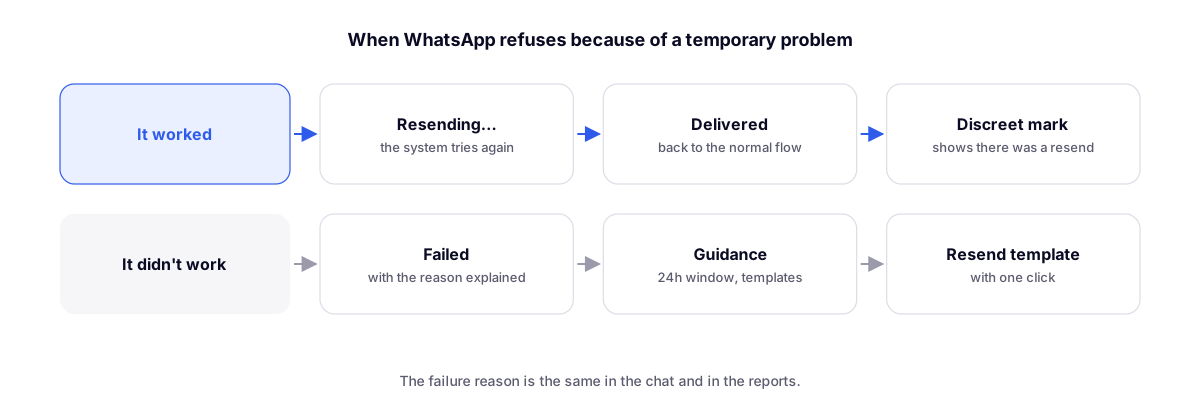
How it works
- On a temporary failure, the message shows "Retrying automatically…" and the system tries again.
- Success: the message returns to the normal flow, with a subtle mark indicating it was resent.
- Failure: you resend the template with one click.
Clear reasons
Each undelivered message explains the reason and what to do, using the same text in both the chat and the reports. The most common cases:
| Reason | What to do |
|---|---|
| 24-hour window closed | Send an approved template to reopen the conversation |
| Undelivered marketing template | Follow the guidance displayed directly on the message |
Related
- More reliable conversations: edited messages, read receipts, and media: what each read receipt means.
- WhatsApp message templates: the templates that reopen the conversation.