What's new ·
Meet Flow: visual automation for your operations
Build "when X happens, do Y" workflows in a visual designer, featuring branches, loops, AI, and any table as a trigger.
By Lucas Marchon, Founder at BrainChat
Every operation has routine processes like "when this happens, do that": notify the customer when an order changes status, create a task when a lead arrives, send an email when a contract is signed. Flow is the module that runs these routines automatically.
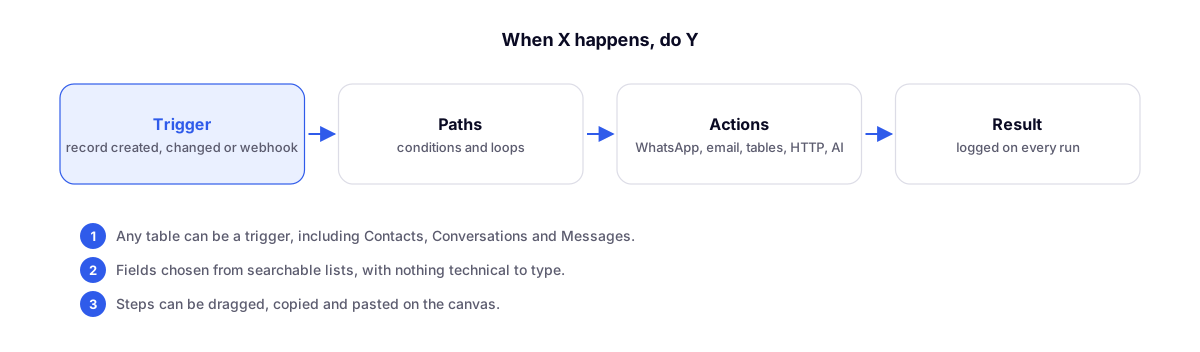
How a workflow works
- Trigger: a record created or updated in any table (including Contacts, Conversations, and Messages) or an external call via webhook URL.
- Branches: conditions that split the workflow and loops that iterate through lists.
- Actions: send a WhatsApp message or email, create and update records, call another system via HTTP, use AI, and handle text, dates, and numbers.
- Result: every execution is logged.
Built for non-programmers
- The design is visual: steps can be dragged, copied, and pasted.
- Fields are selected from searchable lists with source icons, avoiding any technical typing.
Example
Trigger: "order changed to Shipped" → action: send the tracking code via the customer's WhatsApp → action: create a task to confirm delivery in 5 days.
Released next
- Flow: step-by-step testing, versions, and flow-building assistant: test before publishing.
- Tables and Flow: write API, batch registration, and large lists: loops of up to 5,000 items.