What's new ·
Embedded chat linked to the Pipefy card
The embedded chat now opens conversations already linked to the correct Pipefy card.
By Lucas Marchon, Founder at BrainChat
Since August 2025, WhatsApp conversations have been opening directly inside the Pipefy card. What was missing was a stronger connection: the conversation needed to know which card it belongs to, not just which phone number. Now, the embedded chat address accepts the card, and each conversation is linked to the ongoing process.
How it works
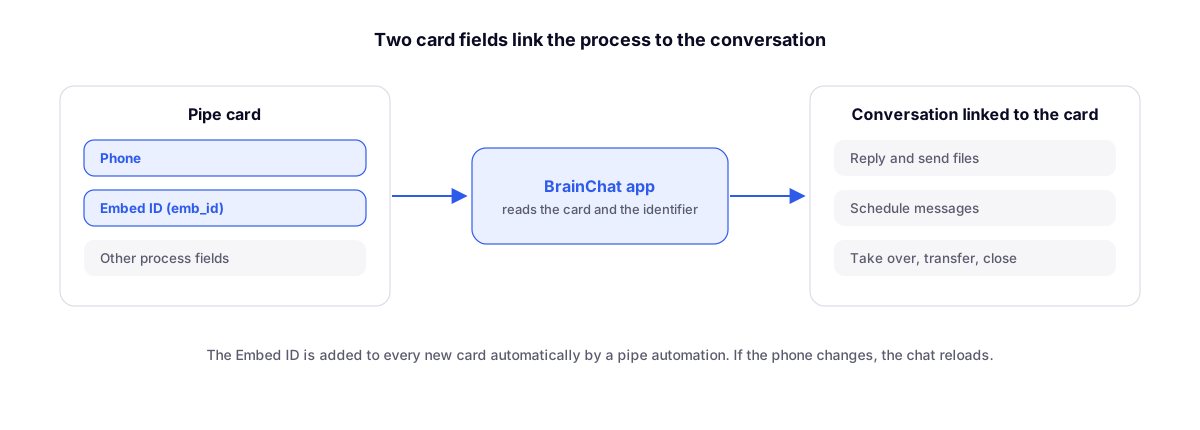
- The card has two fields: Phone and Embed ID (
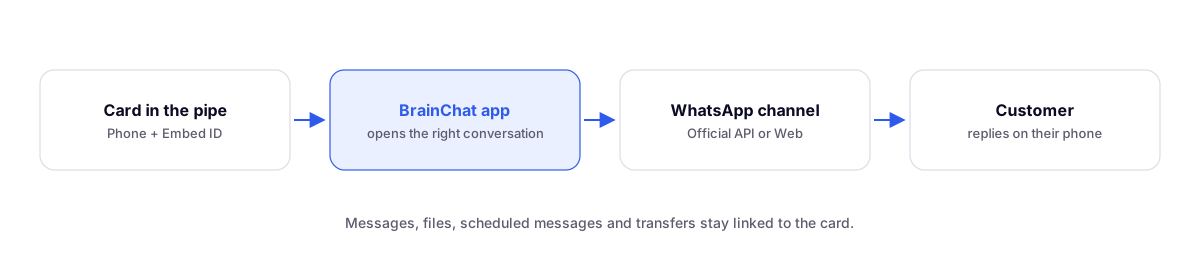
emb_id), which identifies the BrainChat channel. - The BrainChat app, installed in the pipe, reads these fields and the card identifier.
- The conversation opens already linked to that card. If the phone number changes in the card, the chat reloads automatically.
The Embed ID is populated by a Pipefy automation on each new card, and the step-by-step guide is under Embedding in BrainChat.
What you can do from the card
- Read the history, reply, send audio, photos, and documents.
- Schedule messages and view the contact's scheduled messages.
- Take over, transfer, invite colleagues, and close the service.
All without logging into BrainChat: access comes directly from the card.
Tip
If the customer's phone number is in a connected database, copy the number to a card field using a Pipefy automation. The app reads the fields on the card itself.
Before and after
- WhatsApp inside Pipefy, with audio and files: the first version of the chat in the card.
- Embedded chat in any system with its own key: the same chat in systems other than Pipefy.
- On the blog, how to connect BrainChat WhatsApp to Pipefy's CRM AI Studio, step by step.