Guides ·
How AI credits work in Brainchat
What AI credits are, which features use them, how much each plan includes, how to buy more, where to track usage and what changes for the AI agent in 2027.
By Lucas Marchon, Founder at BrainChat
Brainchat's AI features now come ready to use. You do not need to create or register an AI key: the AI is provided by Brainchat and usage is counted in credits.
What AI credits are
Credits are the unit of AI usage in Brainchat. Each time a feature uses AI, part of the organization's credits is deducted. Simple tasks, like translating a message, use a fraction of a credit. Bigger tasks, like building a whole flow with the assistant, use more.
Which features use credits
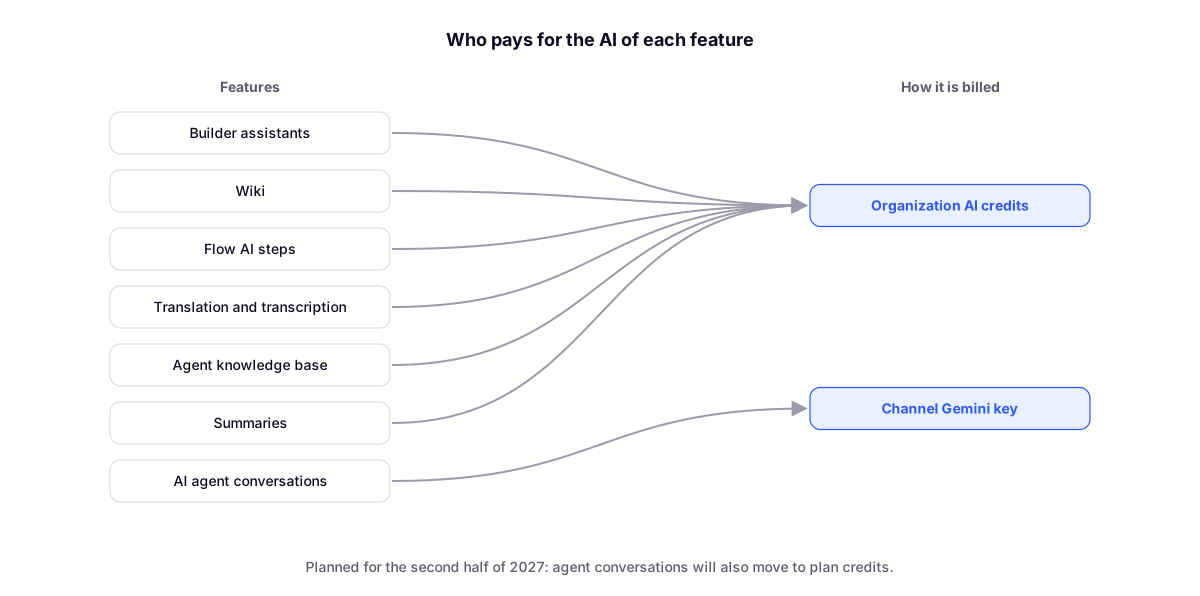
- Building assistants: for the agent, Flow, tables, Studio, landing page, HTTP request and sync.
- Wiki, including advanced mode.
- Flow AI steps and web data collection.
- Translation of conversations and forms.
- Transcription of audio and calls.
- The agent's knowledge base: reading documents and importing websites.
- Summaries of contacts and of transfers between channels.
What does not use credits
The AI agent's conversations (WhatsApp, Live Chat and voice) keep using the channel's Gemini key, as today. Agent Pro remains complimentary until 12/31/2026.
We also plan to move the agent's conversations to plan credits in the second half of 2027. With all AI provided by Brainchat, delivery becomes more stable and consistent across features, without depending on each account's key. We will give plenty of notice.
How much each plan includes
Every plan comes with a monthly allowance so you can try the features. It renews at the start of each month and does not accumulate: what is left over does not carry into the next month.
| Plan | Credits per month |
|---|---|
| Basic and Pipefy | 20 |
| Intermediate | 50 |
| Advanced | 150 |
| Enterprise | 400 |
How to buy more
- Open Billing → Usage analysis → AI credits.
- Click Buy credits and choose how many packs you want. Each pack has 100 credits and costs R$ 10.
- If the subscription is paid by card, pay with the saved card or a new one: credits arrive as soon as the payment is confirmed. If the subscription is paid by invoice, the amount goes on the next invoice and the credits are available right away, up to a monthly cap.
Purchased credits do not expire and are used after the month's allowance. Only whoever handles the organization's billing can buy.
Auto-recharge
To never run out of credits, turn on auto-recharge. You set the minimum balance, how many packs to buy on each recharge and a monthly spending cap. When the balance drops below the minimum, the purchase happens on its own, always respecting the cap.
Where to track usage
In Billing → Usage analysis → AI credits you see:
- Available balance, the month's allowance and purchased credits;
- Allowance usage, with the month's bar;
- Credits per day and per feature;
- Statement with purchases, recharges and usage, showing the agent, Flow, table or page where each credit was used.
The assistants, the Wiki and the Flow AI step also show a badge with the available credits. It turns yellow when the balance is low and red when it runs out.
When credits run out
Features that use credits stop until you buy more and show a notice with the Buy credits button. Transfer between channels is the exception: it never blocks and goes ahead without the summary. The agent's service on WhatsApp and Live Chat is not affected.